
Forward receipts & invoices by email — we'll extract and organize everything automatically
Stop downloading PDFs and chasing receipts. Just forward emails to Receipt Reader AI and get clean, structured data ready for accounting.
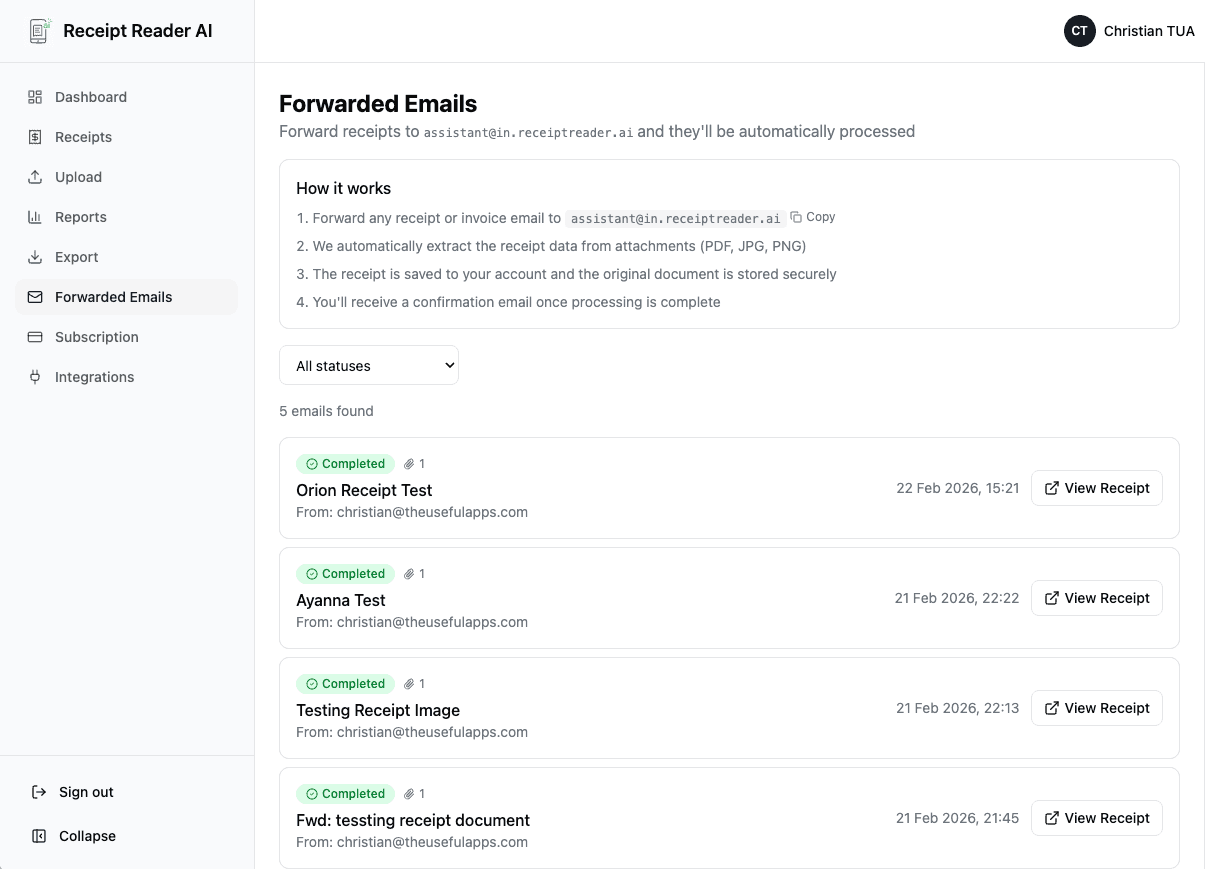
How It Works
From inbox to organized data in five simple steps.
Create Your Forwarding Address
Sign up and get your unique email forwarding address.
Forward Receipts & Invoices
Forward receipts from Gmail or Outlook, or set up automatic rules.
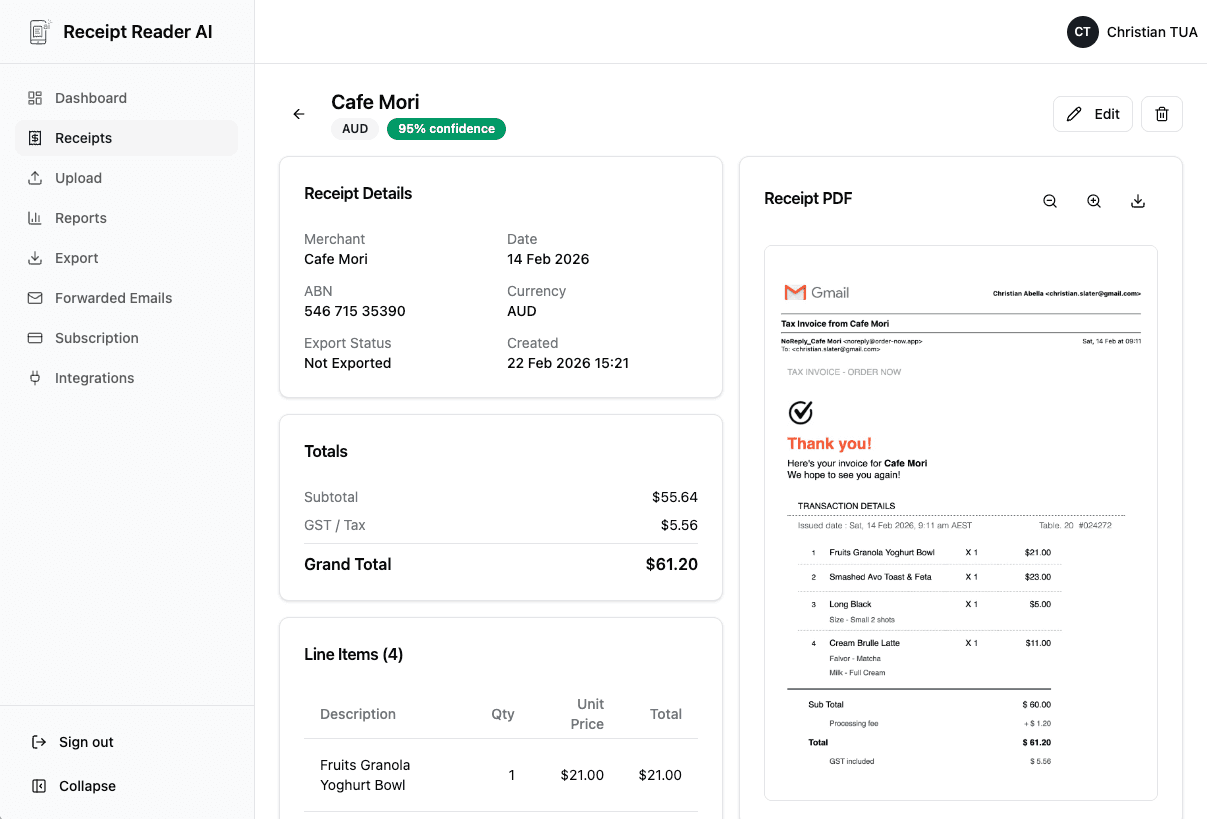
AI Extracts Key Fields
We extract key fields and detect duplicates automatically.
Review & Approve
Review, edit if needed, and approve the extracted data.
Export Automatically
Export automatically to your accounting tools or download CSV.
What You Can Automate
Turn your inbox into a receipt and invoice pipeline.
Email Receipt Processing
Process receipts from email threads and forwarded messages automatically.
Invoice Capture
Capture invoice data from suppliers, including PDF invoices.
Bulk Processing
Bulk processing from shared inboxes like accounts@yourbusiness.com.
Auto-Routing
Auto-route to folders or exports by client or project.
Features That Matter
Everything you need for automated receipt processing from email.
Email Parsing + Attachments
Handles PDF, JPG, and PNG attachments from any email client.
Duplicate Detection
Prevents double entries by detecting duplicate receipts automatically.
Confidence Cues
Review extracted data with confidence indicators for quick correction.
Tax/GST-Friendly
Extracts tax and GST fields where available for accurate reporting.
Export Formats
Export to Google Sheets, Xero and YNAB, or to CSV for MYOB and other accounting software.
Bank-Grade Security
Your emails and attachments are encrypted in transit and at rest.
Who This Is For
Built for professionals who need faster receipt processing.
Integrations & Exports
Connect to the tools you already use.
Xero
Send validated transactions and keep the audit trail clean.
MYOB
Download a CSV that imports into MYOB for reconciliation.
Google Sheets
Simple workflows, custom columns, reporting.
YNAB
Keep personal and business spend organized.
Frequently Asked Questions
Everything you need to know about email receipt scanning.
Does this work with Gmail and Outlook?
Yes! You can forward receipts and invoices from any email client including Gmail, Outlook, Yahoo Mail, and Apple Mail.
Can I automate forwarding rules?
Absolutely. Set up Gmail filters or Outlook rules to automatically forward receipts to your Receipt Reader AI address.
What file types do you support?
We support PDF, JPG, and PNG attachments. Most email invoices and receipts use these formats.
How do you handle duplicates?
Our AI automatically detects and flags duplicate receipts to prevent double entries in your accounting.
Can I review and edit extracted fields?
Yes. Every extracted receipt can be reviewed and corrected before export. Confidence indicators help you spot fields that need attention.
Can I process a shared inbox?
Yes. Set up forwarding rules from your shared inbox (like accounts@) to process all incoming receipts and invoices automatically.
Do you store the original document?
Yes, the original document is stored securely for audit purposes. Files are encrypted and can be downloaded anytime.
What exports do you support?
Export directly to Xero, Google Sheets and YNAB, plus CSV and PDF reports. A CSV imports into MYOB and other accounting software. More integrations are added regularly.
How accurate is extraction?
Our AI achieves 99%+ accuracy on standard receipts and invoices. You can always review and correct before exporting.
Is my data secure?
Yes. All data is encrypted in transit and at rest. We follow industry best practices for data security and privacy.
Turn your inbox into a receipt and invoice pipeline
Forward your first receipt and see it extracted in seconds.
Get StartedNo credit card required. 14-day free trial.