
One Place for Every Business Receipt
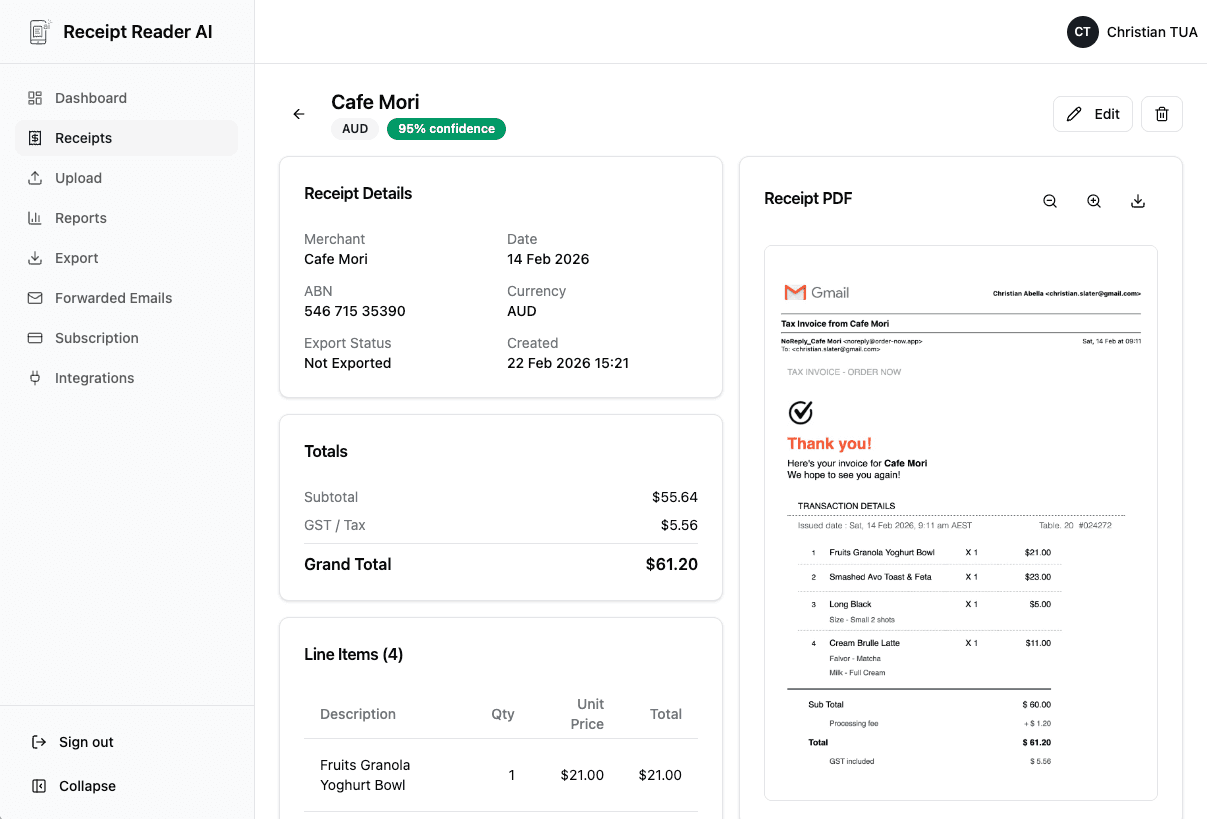
Your team buys supplies, takes clients to lunch, and books travel. Receipt Reader AI collects every receipt, categorizes expenses automatically, and exports clean data to your accounting software.
Web signup, 14-day free trial, and direct export to your accounting workflow.
Decision points
Small Business Expense Tracking Is a Headache
When multiple people are spending company money, receipts get lost, categories get wrong, and month-end reconciliation takes forever.
Employees Lose Receipts
Your sales rep loses the client dinner receipt. Your office manager throws away the supply store receipt. Without a simple capture system, paper receipts vanish within days.
No Expense Policy Enforcement
Without a review process, anyone can expense anything. You find out about questionable charges weeks later when the credit card statement arrives.
Manual Expense Report Pain
Asking employees to fill out expense reports in spreadsheets creates delays, errors, and missing information. Most people submit them late or not at all.
Reconciliation Nightmares
Matching credit card charges to receipts at month end is a time-consuming puzzle. Missing receipts mean unverified charges and incomplete books.
How Small Businesses Use Receipt Reader AI
A workflow that replaces paper expense reports with a modern, automated system your team will actually use.
Team Members Scan
Each employee scans receipts from their phone after a purchase. Coffee runs, office supplies, client meals — everything gets captured in seconds.
AI Categorizes
The AI identifies the merchant and assigns an expense category automatically. Supplier rules ensure recurring vendors are always categorized correctly.
Manager Reviews
You see all submitted receipts in the review queue. Verify amounts, check categories, and approve or reject expenses before they hit the books.
Export to Accounting
Download approved expenses as a CSV or Excel file. Import directly into QuickBooks, Xero, MYOB, or FreshBooks for clean reconciliation.
Better fit for finance workflows
Why Small Businesses Switch to Receipt Reader AI
Replace paper receipts, spreadsheet expense reports, and month-end chaos with a system that runs itself.
Decision points
Receipts Every Small Business Should Capture
These are the most common business expenses that get lost when you do not have a system in place.
Employee Meal and Travel Receipts
Client lunches, team dinners, flight bookings, hotel stays, and Uber rides. These are some of the most frequently lost receipts because employees pay out of pocket.
Office Supply Purchases
Printer paper, ink cartridges, desk accessories, cleaning supplies, and breakroom items. Small purchases that add up to significant deductions over the year.
Client Entertainment Expenses
Sporting event tickets, restaurant meals with prospects, and conference networking events. These require proper documentation including who attended and the business purpose.
Software and Subscription Receipts
SaaS tools, cloud hosting, design software, CRM subscriptions, and communication platforms. Monthly charges that arrive by email and are easy to overlook at tax time.
Insurance and Professional Fees
Business liability insurance, professional licensing, legal consultations, and accounting fees. Annual or quarterly expenses that must be documented for deductions.
Marketing and Advertising
Google Ads invoices, print materials, trade show booth fees, business cards, and promotional items. Track the full cost of customer acquisition by capturing every receipt.
Objections and edge cases
Small Business Receipt Management FAQ
Common questions from business owners and managers about collecting team receipts, automating expense tracking, and exporting to accounting software.
Can my employees submit receipts through the app?
Yes. Each team member can scan and submit receipts from their own phone or computer. As the business owner or manager, you can review, approve, or reject submitted expenses through the review queue. This eliminates the need for paper expense reports and reduces back-and-forth.
How does automated categorization work?
Receipt Reader AI uses AI to identify merchants and assign expense categories automatically. You can also set up supplier rules — for example, all receipts from Staples automatically go to "Office Supplies" and all receipts from Shell go to "Fuel." Over time, the system learns your preferences and categorization becomes nearly hands-off.
Can I export receipts to QuickBooks or Xero?
Yes. You can export your receipt data as CSV or Excel files formatted for import into QuickBooks, Xero, MYOB, FreshBooks, or any other accounting software. The exports include all extracted fields like vendor, date, amount, tax, category, and payment method.
Is there a review and approval workflow?
Receipt Reader AI includes a review queue where managers can see all submitted receipts, verify the extracted data, adjust categories if needed, and approve or reject expenses. This gives you control over company spending without micromanaging every purchase.
How many team members can use the app?
The number of team members depends on your plan. The Business plan supports team receipt collection with multiple users, review workflows, and centralized management. Contact us for Enterprise pricing if you need to support larger teams.
Can I set spending policies or limits?
You can use the review queue to enforce spending policies by reviewing receipts before they are finalized. Categorization rules and the approval workflow help ensure that expenses are properly documented and within acceptable ranges for your business.
Start with the web workflow
Get Your Team on the Same Page
Stop chasing employees for receipts. Start collecting, reviewing, and exporting business expenses from one simple dashboard.
Start Free TrialNo credit card required. 14-day free trial.