
The Receipt Scanner That Helps Freelancers Maximize Tax Deductions
Stop losing receipts and missing deductions. Capture every business expense, separate it from personal spending, and have IRS-ready records when tax season hits.
Web signup, 14-day free trial, and direct export to your accounting workflow.
Decision points
Freelancer Expense Headaches We Solve
Sound familiar? These are the problems freelancers tell us about every day.
Lost Receipts at Tax Time
That coffee meeting receipt from March? Gone. Paper receipts fade, get lost, or end up in the wrong pocket. Digitize them the moment you get them.
Mixing Personal & Business Expenses
When you use the same card for groceries and client lunches, things get messy fast. Tag expenses as business or personal so your books stay clean.
Tracking 1099 Deductions
Freelancers leave thousands in deductions on the table every year. Categorized receipts make it easy to claim every legitimate write-off on Schedule C.
Quarterly Estimated Payments
Scrambling to estimate what you owe each quarter? Organized expenses throughout the quarter make the math simple and accurate.
How It Works for Freelancers
From receipt to tax deduction in three simple steps.
Capture the Receipt
Snap a photo at the coffee shop, forward a digital receipt from your inbox, or upload a PDF invoice from a client.
AI Extracts & Categorizes
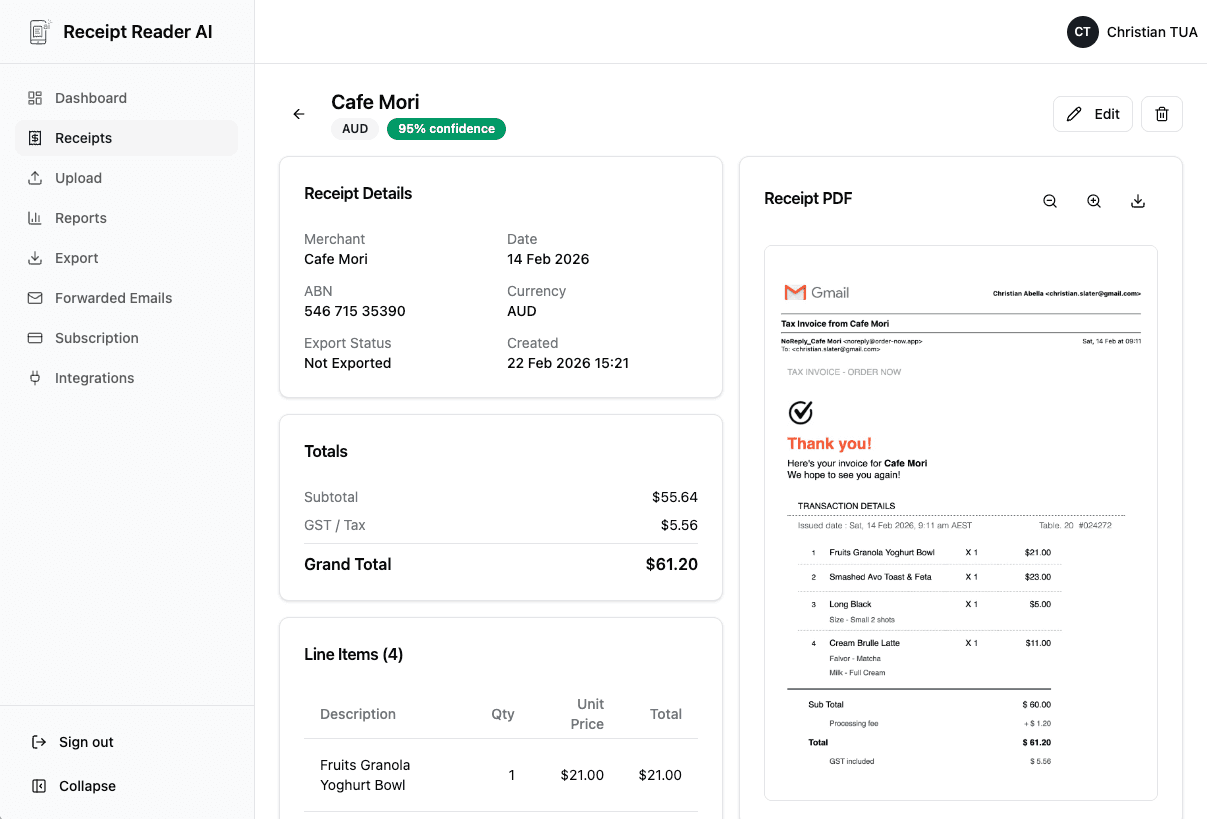
Our AI reads the receipt, pulls out the merchant, date, amount, and tax, then suggests a business category automatically.
Export When You Need It
At tax time or each quarter, export your categorized expenses to CSV, Google Sheets, QuickBooks, or Xero.
Better fit for finance workflows
Why Freelancers Choose Receipt Reader AI
Built specifically for the way freelancers work: on the go, across multiple clients, and always thinking about the next tax deadline.
Decision points
Everyday Freelancer Use Cases
Here is how real freelancers use Receipt Reader AI to stay on top of their expenses.
Client Meal Expenses
Snap a photo of the restaurant receipt right after a client lunch. The AI captures the total, tax, and tip so you can claim the business meal deduction.
Mileage & Fuel Receipts
Capture gas station receipts and track fuel costs for client visits. Keep a clean record of transportation expenses for your Schedule C.
Home Office Expenses
Scan receipts for office furniture, internet bills, and supplies. Organize everything you need to calculate your home office deduction.
Software & Subscription Receipts
Forward email receipts from tools like Adobe, Figma, Slack, or hosting providers. Auto-extract the amount and categorize as a business software expense.
Objections and edge cases
Freelancer Receipt Scanner FAQ
Common questions from freelancers about tracking expenses and managing receipts.
How does Receipt Reader AI help freelancers track expenses?
Receipt Reader AI lets you snap a photo of any receipt, forward email receipts, or upload PDFs. Our AI instantly extracts the merchant, date, amount, tax, and line items, then categorizes the expense so you always have organized records for your Schedule C deductions.
Can I separate personal and business expenses?
Yes. You can tag receipts as business or personal and assign categories like meals, travel, software, or office supplies. When tax time comes, filter by category to see only your deductible business expenses.
Does it work for quarterly estimated tax payments?
Absolutely. With organized, categorized expenses throughout the quarter, you can quickly tally your deductible expenses to estimate your quarterly tax liability. Export your receipts to a spreadsheet or accounting software to calculate what you owe.
What if I get audited by the IRS?
Receipt Reader AI stores the original receipt image alongside the extracted data. You have a timestamped, searchable digital archive of every business expense, which is exactly what the IRS wants to see in an audit.
Can I export my receipts for my accountant?
Yes. Export to CSV, PDF, Google Sheets, or directly to accounting tools like QuickBooks and Xero. Your accountant gets clean, categorized data instead of a shoebox of crumpled receipts.
Is there a free plan for freelancers just getting started?
We offer a 14-day free trial with full access to all features. After that, our Personal plan starts at $5.99/month, which is perfect for solo freelancers tracking their business expenses.
Start with the web workflow
Stop Losing Deductions. Start Scanning Receipts.
Join thousands of freelancers who save hours at tax time and never miss a deduction. Try it free for 14 days.
Start Free TrialNo credit card required. 14-day free trial.