
Stop Chasing Clients for Receipts. Start Bookkeeping.
Receipt Reader AI gives bookkeepers a client receipt collection portal, automated categorization, and a review workflow so you can focus on the books instead of the busywork.
Web signup, 14-day free trial, and direct export to your accounting workflow.
Decision points
The Bookkeeper Struggles We Solve
Every bookkeeper knows these pain points. Here is how Receipt Reader AI eliminates each one.
Chasing Clients for Receipts
You send three reminder emails, make a phone call, and still get a blurry photo of a receipt two weeks late. With a client collection portal, receipts flow in automatically as clients get them.
Inconsistent Data Entry
When you manually type receipt data, every bookkeeper enters it slightly differently. AI extraction ensures consistent formatting for merchant names, dates, and amounts across every receipt.
Time Spent on Manual Categorization
Reading every receipt to figure out if it is office supplies, meals, or travel takes time that adds up fast. The AI learns your supplier rules and categorizes automatically.
Managing Multiple Client Books
Switching between client files, folders, and spreadsheets is a recipe for errors. The practice manager keeps every client separate but accessible from one dashboard.
How It Works for Bookkeepers
A simple workflow from client receipt submission to clean accounting data.
Invite Your Clients
Send an invitation from your practice manager. Clients get their own account where they can submit receipts by photo, email, or upload.
AI Categorizes Automatically
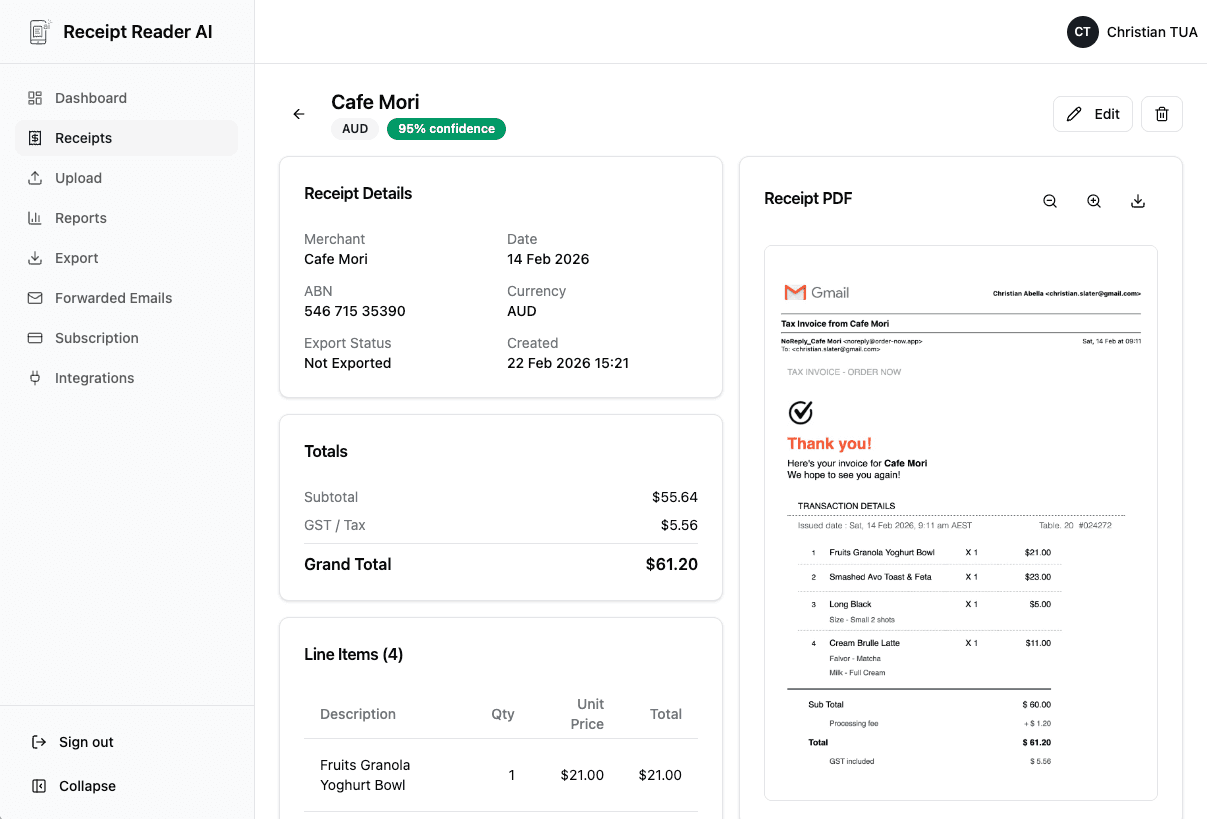
As receipts come in, the AI extracts all fields and assigns categories based on the merchant. It learns from your corrections so accuracy improves over time.
Review & Export
Open the review queue, verify the data looks right, approve the receipts, and export to Xero, QuickBooks, CSV, or Google Sheets.
Better fit for finance workflows
Why Bookkeepers Love Receipt Reader AI
Features designed for the day-to-day reality of running a bookkeeping practice with multiple clients.
Decision points
Bookkeeper Use Cases
Here is how bookkeepers use Receipt Reader AI in their daily practice.
Monthly Reconciliation
Clients submit receipts throughout the month. At month-end, review and approve them all in the queue, then export to your accounting software for fast, accurate reconciliation.
BAS and GST Preparation
Filter receipts by date range, verify the extracted tax amounts, and export a clean GST summary. No more manually adding up tax from a stack of paper receipts.
Client Onboarding
When you take on a new client, invite them to your practice and walk them through the receipt submission process. They start scanning receipts immediately, and you see them in your dashboard.
Receipt Review & Approval
Use the review queue as your quality gate. Verify every receipt before it goes into the books. Reject unclear receipts and ask clients to resubmit with a note.
Objections and edge cases
Bookkeeper Receipt Scanner FAQ
Common questions from bookkeepers about collecting and managing client receipts.
How do my clients send me their receipts?
Your clients get their own Receipt Reader AI account. They can snap photos with their phone, forward email receipts, or upload PDF invoices. Everything flows into your practice manager dashboard automatically, so you never have to chase them for missing documents.
Does it automatically categorize receipts?
Yes. The AI categorizes receipts based on the merchant name and learns from your corrections. Over time, it recognizes your clients regular suppliers and applies the right category automatically, saving you from repetitive manual categorization.
Can I review receipts before they hit the books?
Absolutely. The review queue lets you see all incoming receipts, verify the extracted data, adjust categories if needed, and approve or reject each one. Nothing gets exported until you say it is ready.
How does it help with BAS or GST preparation?
Every receipt includes the extracted tax amount. Filter by date range and export a clean summary of all GST-inclusive expenses, making your BAS preparation faster and more accurate.
Can I manage multiple client books from one account?
Yes. The practice manager lets you invite multiple clients and switch between their receipt feeds. Each client is fully separate, with their own categories, suppliers, and receipt history.
What export formats do you support?
Export to CSV, PDF, Google Sheets, or sync directly with QuickBooks, Xero, and other accounting tools. The exports include all extracted fields and your assigned categories.
Start with the web workflow
Your Clients Submit. You Review. The Books Stay Clean.
Join bookkeepers who have eliminated the receipt chase and cut their data entry time in half. Try it free for 14 days.
Start Free TrialNo credit card required. 14-day free trial.