
Scan invoices and extract the data you actually need
Invoice data entry is a time sink. Receipt Reader AI extracts key invoice fields so you can reconcile faster and reduce errors.
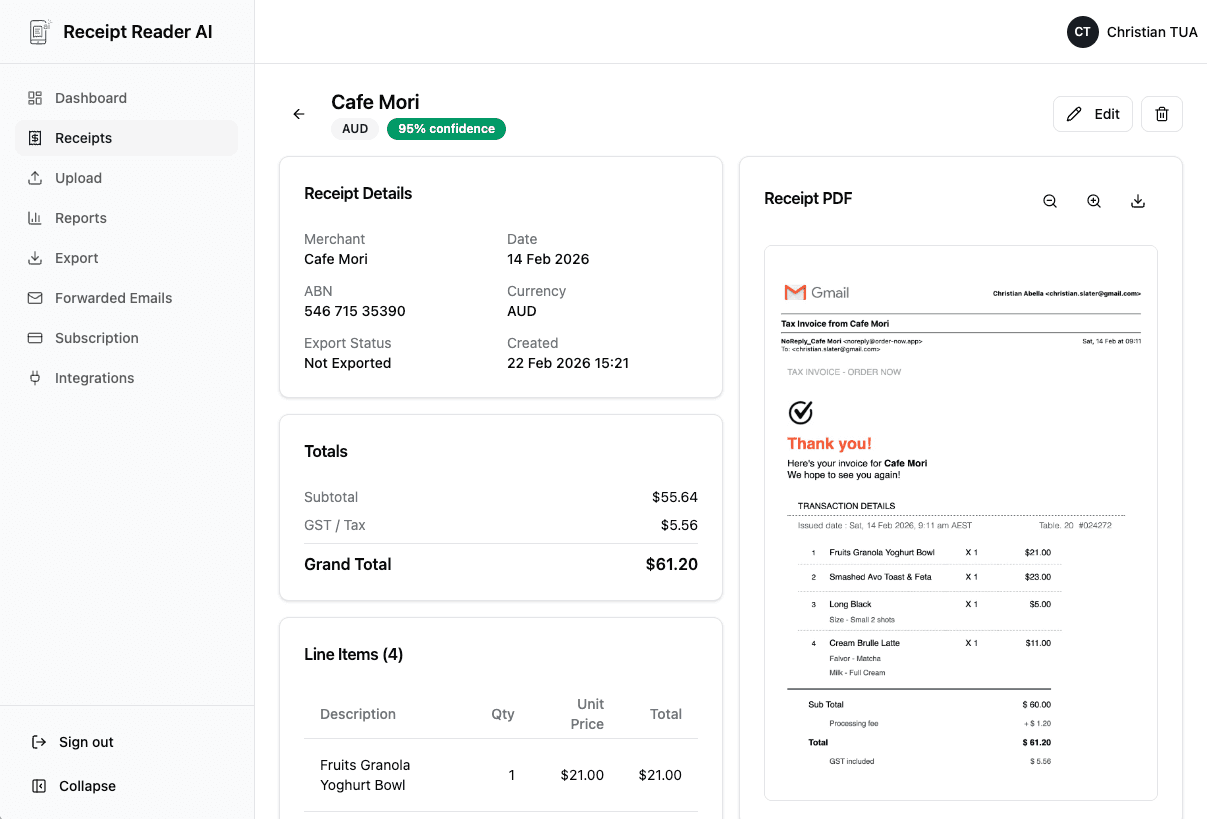
What We Extract
All the fields you need from every invoice.
Supplier / Vendor
Company or person who issued the invoice.
Invoice Number
Unique invoice reference number for tracking.
Invoice Date / Due Date
When the invoice was issued and when payment is due.
Subtotal, Tax, Total
Breakdown of amounts including tax calculations.
Currency
Currency code detected from the invoice.
Payment Details
Bank or payment information where available.
Line Items
Individual items with description, quantity, and price.
How It Works
From invoice to structured data in four steps.
Upload or Forward
Upload invoice PDF or image, or forward by email.
AI Extracts Fields
AI reads the invoice and extracts all key fields automatically.
Quick Review
Review extracted data and edit if needed.
Export
Export to your accounting workflow or download as CSV.
Built for Real Workflows
Handles the invoices your business actually receives.
Use Cases
How teams use Receipt Reader AI for invoice processing.
Accounts Payable
Process incoming invoices from your accounts payable inbox.
Contractor Invoices
Track contractor and freelancer invoices in one place.
Monthly Reconciliation
Reconcile invoices against payments with structured data.
Audit-Ready Storage
Keep originals attached for clean audit trails.
Frequently Asked Questions
Common questions about invoice scanning.
Can I scan invoices from email too?
Yes! Forward invoice emails to your Receipt Reader AI address and they will be processed automatically.
Do you support multi-page invoices?
Yes, our AI handles multi-page PDF invoices and extracts data from all pages.
Do you extract line items?
Yes, where supported. Line items including description, quantity, unit price, and total are extracted.
Can I export to Xero, MYOB, or Sheets?
Absolutely. Export to Xero, MYOB, Google Sheets, CSV, and more accounting-ready formats.
Can multiple team members review?
Yes, team members can review and approve extracted invoice data before export.
What's the best scan quality for invoices?
For best results, use clear PDF attachments or high-resolution photos (300 DPI+). Our AI handles most quality levels.
Do you detect duplicate invoices?
Yes, duplicate detection flags repeated invoices to prevent double payments.
Make invoice processing boring again (in the best way)
Upload your first invoice and see structured data in seconds.
Start Scanning InvoicesNo credit card required. 14-day free trial.